Key Takeaways
- Every family history project begins by scanning photos to protect and share memories.
- 10 Family History Activities include digitizing photos, recreating moments, recording interviews, and writing ancestor stories.
- Engage family members by creating a shared journal, mapping journeys, and making recipe heritage books.
- Transforming walls into memory galleries, time capsules, and sharing personal stories fosters connection across generations.
Estimated reading time: 5 minutes
Discover 10 Family History Activities (and why it all starts with scanning your photos)
It All Begins With One Photo
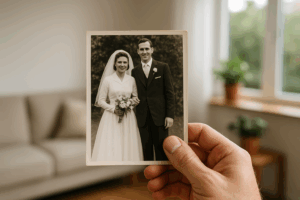 Every family story begins with a single photograph. It might be your parents on their wedding day or a faded image of a grandparent smiling next to an old car. That picture contains more than just color and paper; it embodies life. However, here’s the reality: 96% of printed photos have never been looked at again since the day they were developed. Most of these images are fading away in boxes, albums, and closets. This is why every family history project starts in the same way: by rescuing those pictures.
1. Digitize Your Family Photos
Before you can tell your story, you have to save it. Each photo you scan is a memory rescued from time. At ScanMyPhotos, those moments are carefully digitized — fast, safe, and handled by experts who’ve been preserving the nation’s photo history since 1990. From 35mm film to old albums, billions of images have already been saved. Once your photos are digital, you can search, share, restore, and protect them forever. Everything else in family history starts here.
2. Recreate “Then and Now” Moments
Once your photos are digital, pick a favorite scene — a childhood front porch, a vacation spot, a park. Visit the same place and take a new picture from the same angle. Place them side by side. It’s like time travel in one frame.
3. Record a Living History Interview
Ask a loved one about their favorite memory or what life looked like before smartphones. Record it on your phone. Their voice, their laughter, even their pauses become living history. You can easily store and label those recordings right alongside your digitized photos — creating a complete archive that future generations can hear and see.
4. Tell One Ancestor’s Story
Start with someone who shaped your family’s path — maybe a great-grandparent who immigrated, or an aunt who taught you kindness. Write one page about them. Include a scanned photo and a quote. When your family can see their face and read their story together, it brings your history to life.
5. Start a Shared Family Journal
Create an online space where everyone adds short stories or scanned photos. A few lines each week from different relatives can evolve into a digital family book — a living time capsule filled with memories.
6. Map Your Family’s Journey
Use an online map to trace where your relatives lived and traveled. Drop pins and upload digitized photos from each location. You’ll see how love, courage, and migration shaped who you are today.
7. Create a Recipe Heritage Book
Scan old recipe cards — keep the handwriting, the stains, the love marks. Add photos of the dishes and notes about who made them. You’re not just preserving food traditions; you’re saving stories you can taste.
8. Turn a Wall Into a Memory Gallery
Print your favorite scanned photos, add names and dates, and hang them in one place. When friends visit, you’ll find yourself sharing stories you hadn’t told in years. Every glance becomes a conversation starter.
9. Make a Family Time Capsule
Gather small keepsakes and scanned photos from today — a concert ticket, a favorite toy, a letter to the future. Seal them up with a USB of your digitized memories. Label it with a date to open in years to come. It’s a love letter across generations.
10. Write Your Own Story
Your story matters too. Write one page about a moment that changed you — your first job, your wedding day, your favorite song. Add a photo that brings it to life. Future generations won’t just know what you did — they’ll feel who you were.
Bonus Tip: Back Up Your Digital Memories — Twice
Once your family photos are digitized, don’t stop there. The smartest families keep two backups — one in the cloud and one on a physical drive. Cloud storage protects your pictures from disasters, while an external hard drive keeps them close and safe in your home. Experts, genealogists, and even professional photographers all agree that this is the best habit you can have. Think of it as giving your family memories two lifeboats instead of one. Because when your history matters this much, one copy is never enough.
A Story That Started With One Photo
Carol from Phoenix thought her family’s past was gone forever after a house fire. She sent her only surviving photos to ScanMyPhotos, where every image was professionally restored and digitized. She later used those photos to create a video tribute for her daughter’s wedding — a surprise that brought tears to the entire family’s eyes. That’s what saving pictures really means. Family history isn’t just about ancestry charts or names on paper. It’s about connection. Every scanned photo, every story, every laugh recorded keeps that connection alive.
When you scan your photos, you’re not just saving pictures. You’re saving proof that your family’s love still matters — and always will.
Family History FAQs
Q1: Why start with scanning photos first? The reason is that 96% of photos are never seen again after printing. Once you digitize them, you unlock new ways to share, restore, and protect your family’s story forever.
Q2: How can I get my family involved? Turn it into an adventure. Let kids pick songs for slideshows, grandparents record stories, and cousins label faces. Family history becomes more enjoyable when everyone contributes a piece.
Q3: What makes ScanMyPhotos.com different? It’s the nation’s pioneer in photo preservation since 1990 — trusted by families, media, and even major organizations. Every photo is handled with care, scanned fast, and backed by their 100% Happiness Pledge Guarantee.
[Revised on November 2, 2025].