
9 AI Prompts to Rediscover Your Old Photos
Key Takeaways
- Use AI prompts for old photos to uncover details, restore images, and organize your collection.
- Ask AI questions to spark conversations about forgotten memories tied to your photos.
- Use AI to clean up damage like scratches while preserving important features of the images.
- Colorize old photos with AI, but remember that colors are estimates and keep the original for reference.
- Always make copies before edits; preserve the original digitized scan as it holds historical accuracy.
Estimated reading time: 7 minutes
You did it. The shoeboxes of vintage snapshots are empty. The old printed pictures are scanned. Maybe you now have 2,000, 5,000, or 10,000 photographs sitting on your computer, phone, or flash drive. So what happens next?
These AI photo prompts can help you actually enjoy those scans. They can uncover tiny details you never noticed, help restore damaged copies, find missing information, organize thousands of files, and turn one forgotten picture into a conversation. Please don’t let those photos sit there for another 20 years.
Your Old Photos Have New Tricks
This is where old photos can get really interesting again. AI gives us some surprisingly fun ways to look closer, figure out what we still don’t know, clean up damaged copies, and find the photographs actually worth sharing. Pick an old photo you’ve seen a hundred times and don’t look at the people first. Look behind them. The car in the driveway. The wallpaper. The cereal box on the counter. The restaurant sign. The furniture. What’s on the TV. What everybody is wearing.
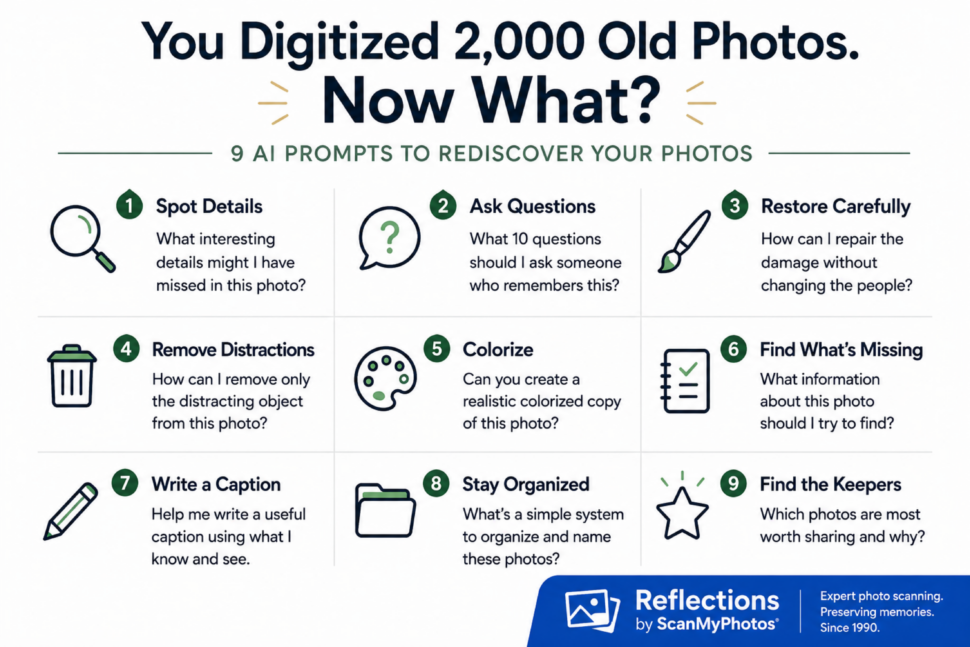
AI Prompts for Photos: 9 Ideas
Ask AI: “What are 10 interesting details in this photo that I might have missed? Look at the background, clothing, signs, cars, buildings, and objects. Tell me what you can actually see and separate that from anything you’re unsure about. Don’t guess names, dates, or locations.”
This can send you down some great rabbit holes. Just remember that AI can sound very sure and still be wrong. Treat anything it identifies as a clue, not a fact.
Another one I really like is turning one photograph into a conversation. Upload it and ask: “Give me 10 questions I should ask someone who remembers this photo. Help me uncover the people, place, approximate date, occasion, photographer, and what was happening. Don’t answer the questions. Just tell me what I should ask.” Then call somebody. Whose house was this? Was that your car? Why was everybody dressed up? Who took the picture? What happened right after this? Those answers may eventually be more valuable than the photograph itself.
AI restoration can also be amazing. It can also get weird fast. If a photograph has scratches, dust, fading, or a crease, make a copy and ask AI to repair the damage without changing the people.
Try: “Reduce scratches, dust, stains, and fading. Don’t change anyone’s face, age, expression, hairstyle, clothing, or body. Don’t beautify or modernize anyone.” The goal isn’t to make a 1952 photograph look like it was shot yesterday on an iPhone. And sometimes that faded edge or little crease is part of the picture you remember. You don’t have to fix everything.
Then there’s the photo where everybody looks great except for the trash can behind them, somebody’s elbow at the edge, or a telephone pole growing out of Uncle Bob’s head. Make a copy and say: “Remove only the trash can behind the people. Rebuild that area naturally. Don’t change anything else in the photograph.”
The word only matters. Be bossy. Colorizing an old photograph can stop you in your tracks too. Ask: “Create a realistic colorized copy of this photograph without changing the people, faces, clothing, objects, or background. Use subtle, historically plausible colors. Don’t add anything.”
Just don’t confuse plausible with true. AI does not know Grandma’s dress was blue. It may create a very convincing blue dress, but that’s not the same thing. I’d put “AI colorized” right in the filename so nobody finds it decades from now and assumes those were the original colors.
Here’s another useful one. Find an old photograph and ask: “What information about this picture should I try to identify now while someone may still remember it? Don’t guess the answers.” You may suddenly realize you don’t know the names, relationships, location, date, occasion, or even who took the picture.

Then start filling in the blanks.
Because someday the person who knows why everybody was standing in that driveway may not be there to ask. AI can also help with captions. “IMG_4827.jpg” isn’t going to help anybody. Neither is “Grandma old picture.” Ask AI to help create a caption using only what you know. Something as simple as “Marcy Goldstone, Long Island, approximately 1974, birthday party, photographer unknown” is enormously more useful than a random filename.
You can do the same thing with folders and filenames. Ask for a simple system built around people, places, years, and events you already know.
Keep it simple enough that you’ll actually use it. The world’s greatest photo organization system is worthless if you quit after folder number three. If you have hundreds or thousands of scans, AI can also help you figure out which pictures are most worth sharing. Ask: “Which of these photographs are most likely to start a conversation? Look for emotion, funny moments, unusual details, interesting backgrounds, and different generations together. Don’t judge them only by technical quality.”
That last part matters. The blurry photograph may be the only picture of everyone sitting around that Thanksgiving table. That’s the one I’d want. One rule before doing any of this: keep the original scan untouched.
Always.
Make copies before you restore, colorize, remove something, or make any other AI change. The original photograph is history. The AI version is something created from it. Keep both. And that’s really the whole point. You spent all that time getting your photographs out of a cardboard box. Don’t just move them into a digital box. Send one to your brother at 11 at night with, “Do you remember THIS?” Ask your mom who the mystery person is. Drop the ridiculous picture into the group text. Print the one everybody forgot existed. Zoom into the background and figure out what that old restaurant was. Ask somebody what happened five minutes before the shutter clicked.
You scanned the photos. Now make them part of your life again.
6 Frequently Asked Questions for AI Photo Prompts
FAQ 1: Can AI restore old photos? Yes. AI can reduce scratches, dust, fading, stains, and minor damage in old photographs. Always work from a copy of the original scan because AI may also invent or alter details, especially faces.
FAQ 2: What’s the best way to scan old photos before using AI? Start with a high-quality digital scan, so AI has as much original detail as possible to work with. ScanMyPhotos.com professionally digitizes printed photos, slides, and negatives, giving you digital files you can then organize, restore, search, share, and explore with AI.
FAQ 3: What is the best AI prompt for old photos? Be specific about what you want changed and what must stay untouched. A good prompt names the damage, tells AI to preserve faces and expressions, and clearly says not to invent missing details.
FAQ 4: Can AI colorize black-and-white photos? Yes. AI can create a convincing colorized version of a black-and-white photograph. The colors are estimates, though. AI usually cannot know the actual color of a dress, car, wall, or other object unless you provide that information.
FAQ 5: Can AI identify people in old photos? AI can describe visible people, clothing, objects, and surroundings, but you shouldn’t trust it to identify unknown people without reliable supporting information. Use it to generate clues and questions, then confirm names with people or records you trust.
FAQ 6: Should I keep the original photo after using AI? Absolutely. Keep the original digitized scan untouched and make separate copies for restoration, colorization, or other AI edits. The original scan preserves what was actually in the photograph. The AI version may contain reconstructed or invented details.
[Edited September 3, 2026].