Key Takeaways
- Old photos often remain unseen; 96% have not been viewed since development, according to a ScanMyPhotos survey.
- After digitizing, decide which originals to keep and know some can be safely recycled or donated.
- Use the 3-2-1 rule to secure your digital files: three copies, two types of storage, one off-site.
- Repurpose traditional items like slide carousels creatively into home decor, while storing essential originals in archival boxes.
- Act now to protect your memories; digitize, backup, and curate your collection instead of hoarding.
Estimated reading time: 5 minutes
What To Do With Old Photos Once They’re Digitized and Creative Ways To Repurpose Slide Carousels
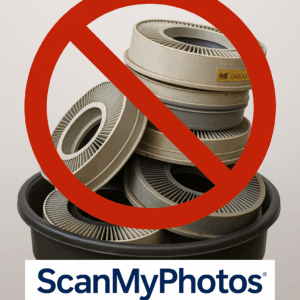
Many old photos remain unseen after they are first developed. Our ScanMyPhotos survey reveals an alarming statistic: 96% of all photographic media have not been seen again since they were developed decades ago. Here’s the truth about what to keep, what to let go, and how to preserve your memories for a lifetime.o preserve your memories for a lifetime. This article helps share ideas on how to dispose of old photos, recycle photos and slides, what to do with slide carousels, digitize, and declutter photo collections.
The Emotional Snap, Recycling Old Photos and Slides
You know that shoebox in the closet? The one crammed with photos, slides, and VHS tapes? They hold your life. But after you digitize them, the question hits hard… do you keep the originals or finally let go? Think of your old photos and slides like a computer’s hard drive. You’d never toss a hard drive without wiping it, right? Every print, slide, and tape is a safe holding your family’s stories. Once you’ve scanned them, the choice is yours: keep, share, or recycle.
The Big Question
As a photo archivist, I hear it all the time: “After digitizing, do I need the originals?” The answer: not everything. But some things, yes. Because memories are emotional, not logical.
My name is Carol from Portland, Oregon. I finally decided to send in all 34 of my old Kodak slide carousels to ScanMyPhotos for digitizing. Once the scans came back, I sat with my kids and labeled every photo so they’d know the people and places. After that, we had to decide what to do with those empty carousels. We donated a few to the local theater group for stage props, gave a couple to my grandkids for school projects, and recycled the rest. The real treasure is now having every slide safely stored on the cloud — no more boxes in the attic, just instant access to a lifetime of memories.”
Step One: Make Your Digital Files Safe
- Before decluttering, secure your scans. Follow the 3-2-1 rule:
- Keep three copies.
- Use two types of storage (cloud + external drive).
- Store one off-site for safety.
- Add notes or metadata so future generations know who’s who. Without names, photos lose their meaning.
Step Two: Decide What’s Worth Keeping
Here’s the truth: you don’t need every negative or VHS. But you do need the treasures. The baby photo with your grandma’s handwriting on the back. The wedding print has a crease in the corner. The only shot of your dad teaching you to ride a bike. Those stay. The rest? They can be passed on, donated, repurposed, or recycled.
Special Note: 35mm Slides and Carousels
Slides deserve their own spotlight. For decades, families gathered around projectors, watching vacations and birthdays flicker on living room walls. Today, those plastic Kodak and Ektachrome carousels and slide boxes take up huge amounts of space. Here’s how to handle them after digitizing:
Keep Select Originals
Some slides hold historical or personal value. Save the most meaningful in archival slide sleeves.
Let Go of the Plastic
Carousels and slide trays are bulky, heavy, and not archival-safe. Once digitized, there’s little reason to keep every carousel. Recycle the plastic when possible. Donate them to a local photo business, school, or museum, etc.
Store Smarter
If you do hold onto some originals, move them into slim archival boxes instead of bulky trays. They’ll take up less space and last longer.
Repurpose Creatively
Some artists transform slides into lampshades, shadow boxes, or wall collages. A single carousel can become a work of art. Bottom line: the photos and slides are memories… the plastic carousel is just furniture for them. Keep the story, not the storage.
Five Smart Ways to Clear Space
- Keep the Best Originals. Save the most meaningful in acid-free archival boxes.
- Share With Family. Give prints to relatives who appear in them. Memories multiply when shared.
- Donate What Matters. Museums or local archives may want historically important images and those plastic trays.
- Transform slides into shadow boxes or collages. A few display-worthy boxes are tucked away.
Why It Matters Now
Your closet is not a museum. And time won’t stop. Film breaks down. Photos fade. Mold creeps in. Digitize everything. Back it up. Keep a few. Release the rest. Think of it as curating your life’s highlight reel instead of hoarding a warehouse.
Call to Action
Before you walk past those stacked boxes one more time, pause. Ask yourself: which of these will still matter to my kids — or even to me — in fifty years? Your story deserves to be safe. Digitize it. Protect it. Pass it on.
Photo Scanning FAQs
Q1: Should I keep 35mm slide carousels after scanning? No. The slides may matter, but the plastic carousel doesn’t. Keep selected slides in archival sleeves instead.
Q3: What if my family wants the originals? Share them. Give prints or slides to relatives who appear in them. Digitized copies mean everyone can keep a version.
The Great Photo Blackout: Why 96% of Pictures Stay Hidden
Why Digitizing Photos Is the Best Gift You Can Give
Lost Your Photos? Here’s How to Protect Them Forever
Photo scanning service available! Digitize your old photos and preserve your cherished memories. Learn which items to keep, recycle, and how to protect your family’s story. The service includes guidance on handling 35mm slide transparencies, negatives, and carousels. Enjoy secure digital backups, maintain your treasured photos, and declutter your space. Get started today at ScanMyPhotos.com.
No. The slides may matter, but the plastic carousel doesn’t. After digitizing your slides, keep selected slides in archival sleeves instead and donate or recycle those plastic carousels.