Key Takeaways
- Adding names, dates, and places transforms family photos into meaningful stories; without metadata, they remain just pictures.
- Metadata turns unknowns into knowns by providing essential context: who, when, where, and why.
- Use high-quality file formats and tools like Lightroom to add and preserve metadata for future generations.
- Following best practices in scanning and backing up ensures that family histories remain intact and accessible.
- Digitized and tagged photos become searchable archives, keeping family memories alive for future generations.
Estimated reading time: 4 minutes
Names, Dates, Places: How Metadata Keeps Family Photos Alive
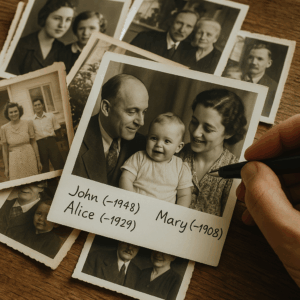
A photo without a story is just a picture. Adding names, dates, and places transforms mystery faces into living family history. Turn old photos into living history. Learn how genealogists use metadata to keep memories alive for your family’s future.
The Forgotten Faces in the Box
You’ve probably opened a shoebox of photographs and come across faces that you couldn’t identify. Those smiles are frozen in time, but they remain a mystery without any context. However, by adding metadata—such as names, dates, and locations—you can transform those photos into cherished memories. For example, “Unknown man at picnic” can become “Grandpa James, 1947, celebrating his return from the war.” Often, just one detail is enough to restore a picture’s story.
Why Metadata Matters
Archivists say it best: a photo without information is like a book without a title page. Metadata ensures the story remains attached. At a minimum, capture four essentials:
- Who is in the photo
- When it was taken
- Where it happened
- Why it matters
Even if you don’t know every detail, add what you can. A note like “cousin with Grandma, circa 1950” is better than leaving it blank. Metadata isn’t just data. It’s storytelling.
How to Add Metadata That Lasts
Genealogists and archivists often ask: How do I add details that future generations can actually read? Use stable file formats like TIFF or high-quality JPEG. Embed notes in IPTC/XMP fields using tools like Lightroom, ACDSee, or XnView MP. Add redundancy: keep metadata in the file, in sidecar files, and in a master spreadsheet. That way, if one version fails, the story survives.
From Unknown Albums to Known Histories
Every family has one — an album filled with strangers. Metadata can help uncover these mysteries. Start by scanning and sharing the images. Relatives often recognize faces that you may not. Even small clues, like street names or churches, can be helpful.
“I uploaded a box of unmarked photos, and within days, my aunt in Seattle recognized her childhood neighbor. That one detail cracked open the whole album.” — Denise, Chicago. Albums full of “unknowns” can become treasures once details are added.
Best Practices from the Archives
Professional archivists use a few simple rules anyone can follow:
- Scan at the highest resolution you can (600 dpi for prints, 4,000 dpi for slides/negatives).
- Use TIFF for masters, JPEG or PNG for everyday sharing.
- Follow the 3-2-1 backup rule: three copies, two types of media, one offsite.
- Revisit files often. Update names and details as new information surfaces.
“I lost an entire album in a basement flood, but because I had digital backups, nothing was truly gone.” — Robert, Portland
Turning Photos Into Searchable Family History
Once digitized using a photo scanning service like ScanMyPhotos and tagged, photos become a living library. You can type a name, place, or year, and watch stories unfold. Metadata transforms chaos into a searchable, shareable archive that keeps family history alive.
“After tagging my photos, I could instantly pull up every picture of my mother from the 1960s. It felt like opening a time capsule.” — Linda, San Diego
MetaData FAQs
Q: What’s the minimum info I should add? At least, who, when, and where. Those three give every photo context.
Q: Can metadata be added after scanning? Yes. Even years later, you can embed names, dates, and locations into digital files.
Q: Which formats preserve metadata best? TIFF is the gold standard. Thus, high-quality JPEG and PNG also work if you embed metadata properly.
Photo scanning service. Digitize photos. Preserve old photos. Convert printed photos to digital. Metadata keeps stories alive. When you scan and tag names, dates, and places, your family’s history becomes searchable and safe. Don’t let unknown faces remain mysteries. Future generations deserve more than nameless albums. Start preserving today. Learn how metadata and digitization protect memories from loss and keep your family history alive. Explore more tips at ScanMyPhotos.com/blog
.
Yes. Even years later, you can embed names, dates, and locations into digital files.