
How to prepare your photos for the prepaid photo scanning box
What is Accepted/Not Accepted for Scanning?
- This service is for photo scanning only. Negatives, slides and other media are not accepted.
- Photo must be at least 3"x3" and no larger than 8"x10" in a prepaid photo scanning box. All sizes between are accepted.
- Newspaper clippings, odd shaped photographs and laminated images cannot be scanned. Photos must be square or rectangular in shape.
- Photos must be able to bend/curl easily. Photographs cannot be thicker than a modern Polaroid picture and represent the thickest photograph we can accept for scanning. Many older (1960's era) Polaroid's were mounted on cardboard. These old Polaroid's are too thick and cannot be scanned.
- No copyrighted photos may be submitted for legal reasons. Copyrights last for 70 years after the death of the photographer. In order to scan copyrighted photos, we must have a copyright release from the photographer.
- Any photo that does not meet these requirements will not be scanned and returned to you unscanned.
Preparing your Photos for Scanning
- Remove all photos from albums, envelopes, etc. Make sure no staples, paper clips, Post-It notes, etc. are attached and that there is no sticky material on the photo which can cause the photo to stick to other photos.
- You can send in any size photo that meets the requirements however ALL photos sent to be scanned must be grouped by size. For example, all the 4x6's are bundled together, all the 5x7's are bundled together within the box. The entire order must be organized in this manner. If you do not organize your photos in this way, you must order the "Scan in Order" service for an additional fee. For more information regarding the scan in order service, see the 'Scan In Order Service Explained' section below.
- Make sure every photo within a bundle is right side up and facing the same direction. If upside down the scans also will be upside down or face down (so the back of the photo is scanned, not the front).
- Additionally, all photos must be lying horizontally regardless of orientation (vertical or horizontal). If you wish to have your vertical images rotated to the correct orientation, we do offer that as an additional service for an additional $84 per box or this can be done on your home computer.
- Fan through all your photos. This helps confirm that the photos are loosely presented and without any impediment, such as glue or sticky materials. This also helps to identify if your pictures are dusty and to help remove any materials that might cause an imperfect scan.
- HELPFUL TIP: Use a soft, lint-free cloth to wipe the front and back of each photo to remove any excess dust to achieve optimum scans.
- Any substance (i.e. water marks, pen marks, etc.) that is on the photograph will be scanned on the photograph.
- Photos cannot be glued or taped to anything else. They will jam in the scanner as they are too thick.
- Note: Curled photos may have a haze or be scanned out of focus due to their inability to lie flat on the scanning glass. Often times this presents itself as a purple haze over part of the image.
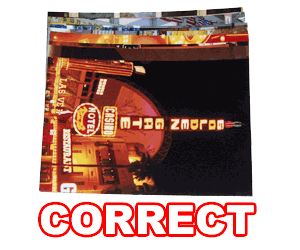
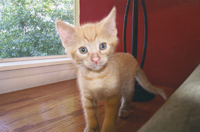 Photos should be submitted right side up. |
 Photos submitted upside-down will be scanned and placed on the DVD upside-down. |
 Photos submitted face down will be scanned and placed on the DVD face down. |
 |
 |
Scan in Order Service Explained
If you do not wish to organize your photos by size or if you need your photos to be scanned in a specific order, you must order the "Scan in Order" service for an additional fee. Ordering the "Scanning in Order" service will let the scanning technician know that you need to have your photographs scanned in the order you have specified. This service overrides the necessity to place your order in size order but it is still highly recommended to organize your photos within each bundle by size to prevent unwanted bending of larger photos.
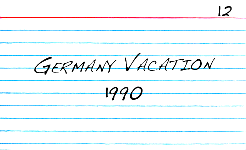
If the additional scan in order service is ordered, we recommend that you include index cards, either standard 3.5"x5" or 4"x6" size, with handwritten notes describing the category or year. These will be scanned along with the pictures and will be the first image in each series of photos. DO NOT use Post-it notes (they will be either scanned on the image or thrown away) or scraps of paper (they will jam in our scanner and be thrown away).
The number in the top right corner tells us the order in which to scan. If the bundle order is not important, we do not need the number. We do not offer reorganize your photos in chronological order. We either follow the number in the corner or scan in random group order when no number is present. To avoid any confusion, please ONLY use numbers, no letters or combination of numbers and letters (i.e. 1A, 1B, 2A, etc).
Packing the Box
- Stuff your box well and don't be afraid of tape to ensure your box remains sealed. Use newspaper or other packing materials to make sure your box is completely full and solid. If your box has extra room, your photos might shift during delivery and there is a risk that the box might otherwise get creased or crushed. DO NOT USE POPCORN for packing your photos. It breaks apart during shipping and sticks to the photos. This greatly increases your chance for bad/dirty scans.
- Photos should be fairly evenly stacked in a box and packed so shifting will not occur during shipping. We recommend using rubber bands to group them in batches of about 100-150 photographs. Please do not put them in baggies as this method of storage does not ensure the photographs will not shift around and are limited in space.
- For other questions, please visit our Scanning FAQ's
Legal Stuff
- Due to the nature of the prepaid boxes, we cannot offer a refund once the empty box has been shipped.
- Due to swift technological changes, your returned prepaid box order for scanning must be received back to ScanMyPhotos.com within 6 months from the date the order was placed. Otherwise, the box expires and no consideration, obligation or monetary reimbursement of any kind will be provided.
- If multiple boxes are ordered, there is no need to send them all in at the same time. Fill one up, save the others for a later time, or send them all in at the same time. It is up to you.
- If the preceding guidelines are not followed, the unprocessed order will be returned to you and a handling fee not to exceed $25.00, plus the return postage will be charged to your card.
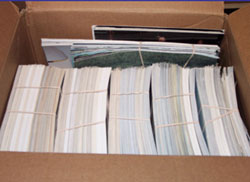
Acceptable Packaging |
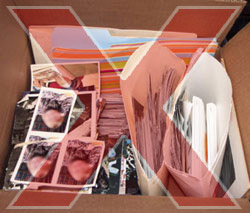
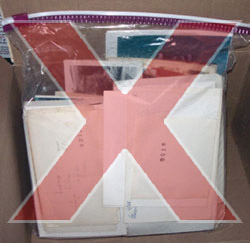
Unacceptable Packaging |
 |
 |
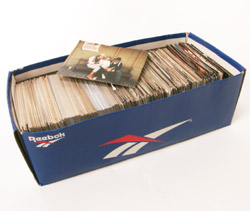
All similar sized photos are packaged
together and laying horizontally. Photos packaged tight so no shifting
will occur in shipping. |
Not organized by size. Photos
are right side up and others face down. Photos are not packaged to avoid shifting
in mail. |
 |
 |
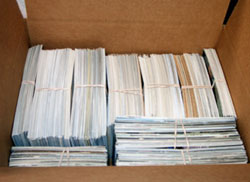
Large groups of photos rubber banded together, grouped
by size. Empty side space used for more photos. |
Not all lying horizontally, not organized by size,
not bound to avoid shifting in shipping. |
 |
 |
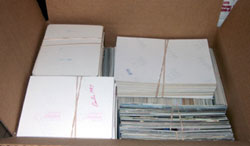
Photos organized by
size, rubber banded to keep from moving in shipping. See below for more
with this example. |
Photos in folders and envelopes, odd shaped photos,
negatives enclosed. |
 |
 |
There was empty space on top of the photos,
small rubber banded groups used to fill up empty space. |
Photos in Ziploc bag,
photos not secured to prevent shifting. Photos facing different directions,
not organized by size. |
 |
|
Unable to scan severely curled photos. Photos with a slight curl may have a haze or be scanned out of focus due to their inability to lie flat on the scanning glass. Often times this presents itself as a purple haze over part of the image. If the photo is substantially curled it will not be scanned. |