
How to prepare your slides for the prepaid slide scanning box
Print Instructions 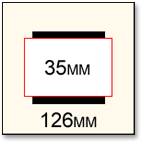
What is Accepted/Not Accepted for Slide Conversion?
- This service is for mounted 35mm slide transfer only. Negatives, unmounted slides, photos and other media are not accepted.
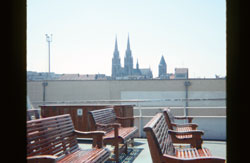
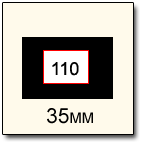
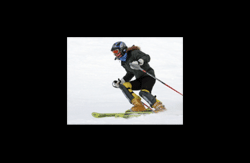
- We can scan 126mm mounted slides, however due to the fact that our scanners are calibrated for 35mm slides, some of the image will be cropped out. We can also scan mounted 110 slides, however we cannot zoom in on the image and a large black border will be on the scan. See below for examples.
Preparing your Slides for Scanning
- If your slides are in carousels, sleeves or other specially designed box to hold slides, you may keep them in the their protective casings. Please note that when shipping bulky items such as carousels, higher than average shipping charges may be incurred due to the extra space and weight the carousels add to the shipment.
- If the slides are not housed in any slide storage device, please rubber band about 50 slides together to create small bricks of slides. This will help protect the slides during shipping. We also recommend wrapping the bricks in tissue paper or bubble wrap to futher protect the slides.
- When empty space is present, use packing materials such as paper or bubble wrap to fill the empty space to help protect your slides during shipping. We do not recommend using packing popcorn as it can break apart and become lodged within or stuck to the emulsion of the slide (if loose). If this happens, the scan may turn out less than ideal.
Technical Information
- All scanned slides are in a 24-bit JPEG format.
- Premium Scanning includes color and density corrections and enhancements on each image using Digital ICE which works to detect and reduce dust and surface scratches without softening, blurring, or altering the image. (Note: Digital ICE cannot be used with B&W or Kodachrome slides. These slides will be scanned without Digital ICE. Kodachrome slide film uses a unique dye that responds differently from other slide films. Due to the nature of the dye and the Kodachrome film development process, Digital ICE can misinterpret certain image detail as a defect and will attempt to remove it from the image.)
- For more information, visit our Frequently Asked Questions
File Size Information
| Resolution | Uncompressed file size | JPEG file size | Pixel by pixel dimension | Megapixel equivalent |
|---|---|---|---|---|
| 2000 DPI | 18.4 MB | 3-5 MB | 2048 x 3140 | 6.4 MP |
| 4000 DPI | 66.5 MB | 13-16 MB | 3894 x 5971 | 23.3 MP |
Megapixels vs. Maximum Print Size
| Resolution (MP) | Pixel Resolution | Print Size @ 300ppi | Print size @ 200ppi | Print size @ 150ppi |
|---|---|---|---|---|
| 2000 DPI (6.4 MP) | 2048 x 3140 | 6.8" x 10.5" | 10.2" x 15.7" | 13.6" x 20.9" |
| 4000 DPI (23.3 MP) | 3894 x 5971 | 13" x 19.9" | 19.5" x 29.9" | 26" x 39.8" |
Legal Stuff
- Due to the nature of the prepaid boxes, we cannot offer a refund once the empty box has been shipped.
- Due to swift technological changes, prepaid slide transfer boxes must be received back to ScanMyPhotos.com within 6 months from the date the order was placed. Otherwise, the box expires and no consideration, obligation or monetary reimbursement of any kind will be provided.
- If multiple prepaid boxes are ordered, there is no need to send them all in at the same time. Fill one up, save the others for a later time, or send them all in at the same time. It is up to you.
- Before ordering, you must read these frequently asked questions and by submitting your order you fully agree to all terms and conditions.